



Associated With







Sudden issues with Draytek rebooting due to security vunerability. Firmware update should be actioned after disconnecting the device from the internet. If no new firmware is available, SSL should be turned off by following our instructions.
Test your network now


If you have a DrayTek router with the following model number and you are experiencing issues, please try downloading and installing the latest firmware, as this may be a security issue:
This article has instructions on how to update the firmware of a Draytek router
If your Draytek model is old and no longer receiving firmware updates, you will need to disable SSL services on it until, hopefully, Draytek release an emergency firmware update for End of Life models.
We have tested this by disabling SSL on a router, and that appears to have resolved the issue. Here are the steps:
Firstly, disconnect the router from the internet, this will stop the Draytek from rebooting. This is usually a telephone wire going from the Draytek router to the wall. If you have a lease line, this will be an ethernet cable connected to the WAN port on the Draytek. Unplug that.
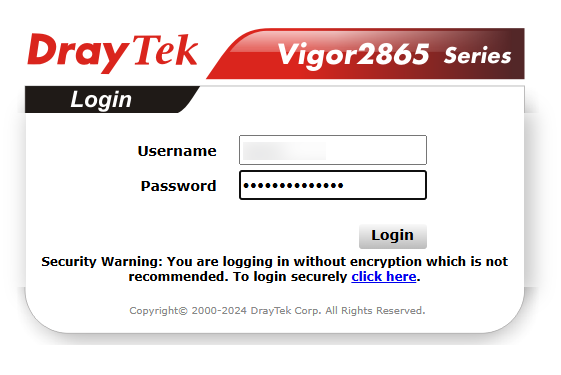
Now, using a PC on your network, login to the web interface of your Draytek Router. This is done by typing the IP of the router into a web browser. This is typically http://192.168.1.1
Your login details should be on a sticker on the router itself, if not contact support for login details.
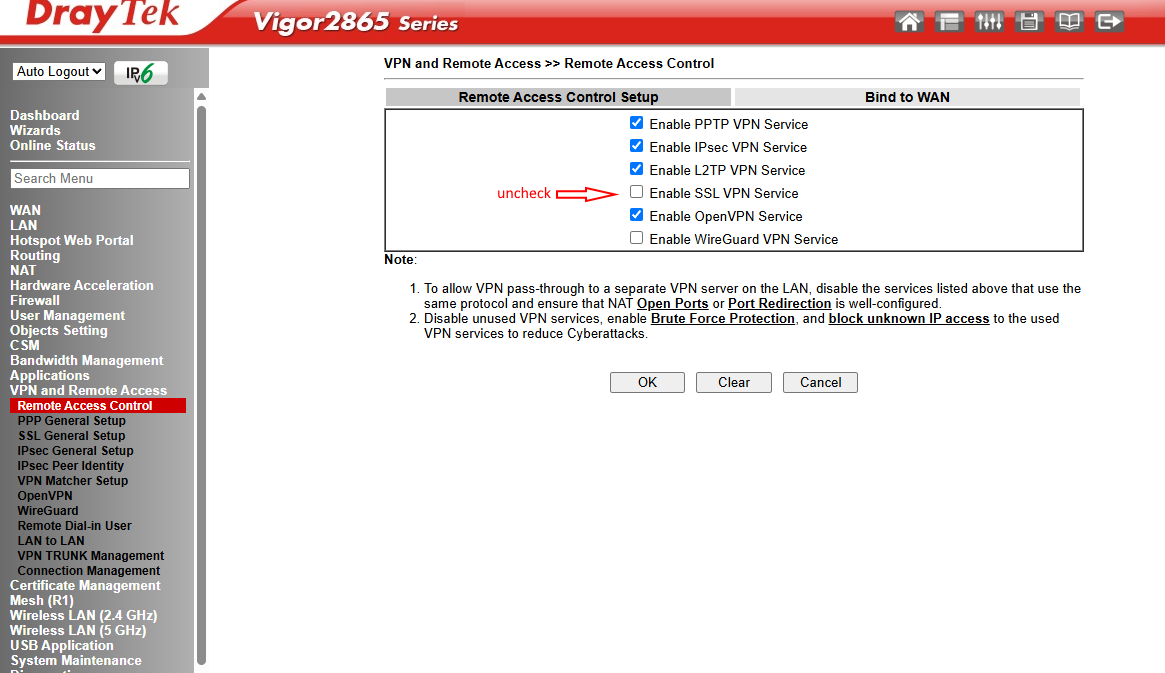
On the left navigate to VPN and Remote Access -> Remote Access Control
Uncheck Enable SSL VPN Service. Press the OK button
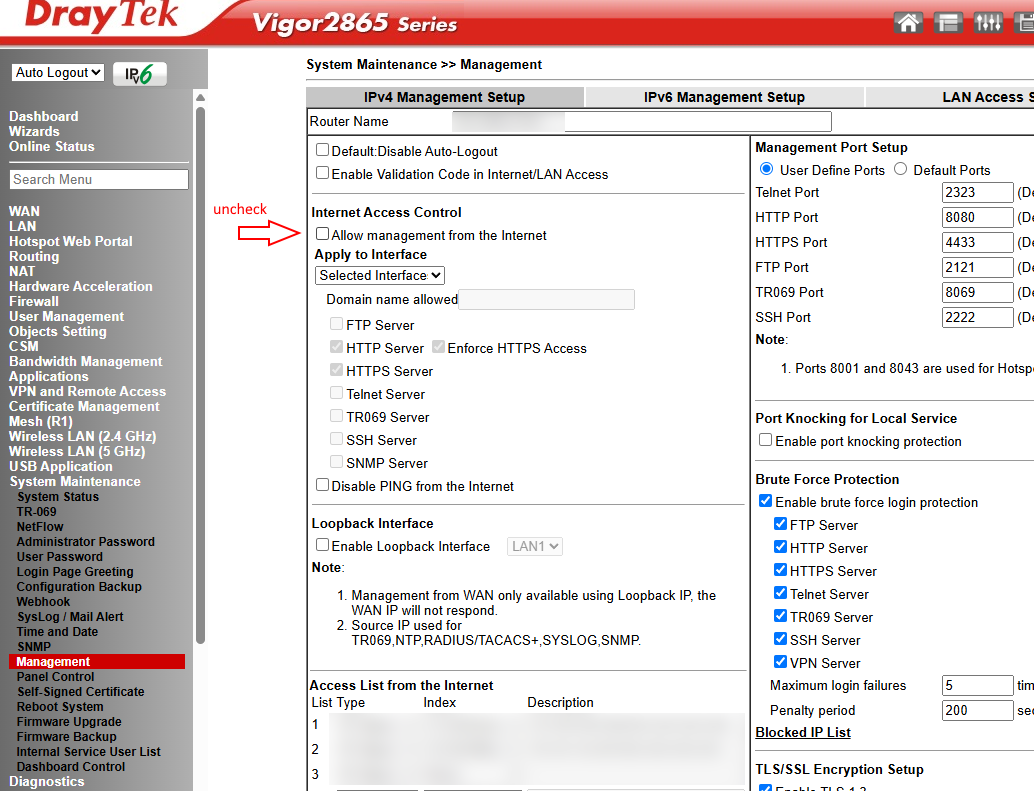
Next, on the left, go to System Maintenance -> Management
Uncheck the box labelled "Allow management from the internet"
Scroll down and press the OK button.
Now reboot the router and re-attach it to the internet.
Choose the version depending on your router model number and see if a firware update resolves the issue.

Network Troubleshooting VoIP Phone Systems
Sky and VoIP Phone System Issues
Wi-fi Troubleshooting with VoIP Phone System
Troubleshooting VoIP Phone System over 4G and 5G
Troubleshooting VoIP Phone System with loss of power
Disabling SIP ALG on Technicolor Router Guide
Setting up your Firewall Setting for VoIP
Mobile phone power saving settings and VoIP Issues
Having issues porting your number to a VoIP System
Starting Troubleshooting your VoIP Phone System
Experiencing call dropping on VoIP Phone System
Experiencing quiet calls on VoIP Phone System
Fed up of a deal always looking to good to be true? Since we are contract free, you always pay the price on our website, ensuring no hidden price rises. Pay the same as a new customer every month!

We guarantee 99.9% uptime backed up by our SLA on our robust UK dedicated VOIP platform in conjunction with CISCO & Openreach. Monitored and managed 24/7.
All are calls are answered in less than 10 seconds here in the UK, why not call us now and find out how friendly our team are!

All our VOIP systems are configured in the cloud, so there are no configuration, installation or support charges. Our phones simply auto install when plugged in. Free Support


Our fantastically friendly support team are based in the UK in Stoke-on-Trent, Staffordshire.
Cloud experts for over 25 years, why not chat now to a member of the team and find out how we can help you transition your phone system to the cloud.

Part of the systems.co.uk Family
Industries:


Updated on 24/03/2025 by Juliet Moran
As the Technical Director at TelephoneSystems.cloud, I bring over 29 years of extensive experience in cloud technology. As a woman in the tech industry, I am committed to paving the way for the next generation, demonstrating that innovation in technology should be inclusive of both women and men. My goal is to inspire and empower future generations to actively contribute to the advancement of technology regardless of gender.
